Autoresponder
Autoresponder
Autoresponders watch messages or reactions and reply for you.
They can send text, a saved embed, a reaction, or a mix of those.
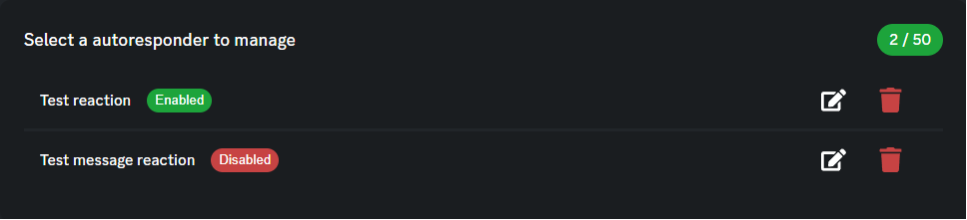
Limits
Free servers can usually save 2 autoresponders. Premium can usually save 50. Your live plan in the dashboard is the real limit.
How they run
- Message rules run when someone sends a message the bot can see.
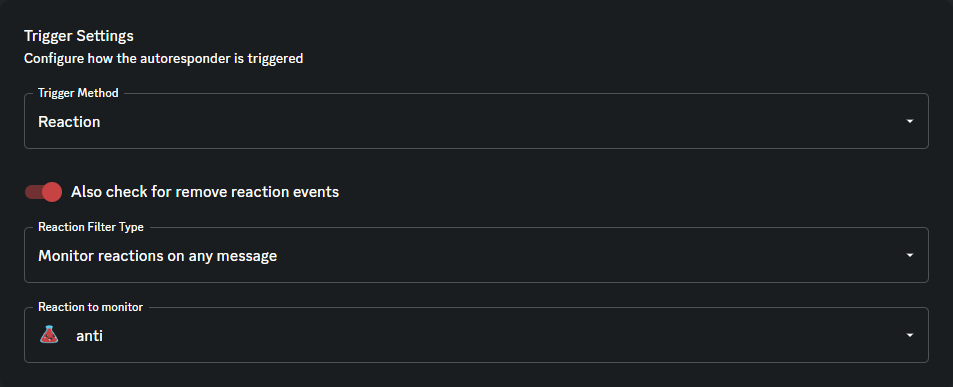
- Reaction rules run when someone adds that emoji (and optionally when they remove it).
- Changes can take a few minutes to show up.
Test in a private channel first. More than one rule can fire on the same message.
Message trigger
You pick the trigger text and how it should match:
| Match type | When it fires |
|---|---|
| Check entire message | The message contains the text anywhere |
| Check start | The message starts with the text |
| Check end | The message ends with the text |
Matching ignores capital letters.
Reaction trigger
| Option | Meaning |
|---|---|
| Reaction to monitor | A server emoji to watch. Normal Unicode emojis cannot be picked here. |
| Any message | Fires on that emoji, no matter what the message says. |
| Only matching messages | The message text must match exactly (ignoring capital letters). |
| Also check remove | Removing the emoji can fire the same response. |
Reactions from bots are ignored.
Extra options
| Option | What it does |
|---|---|
| Delete trigger message | Deletes the original message after the delay you set. 0 means delete right away. |
| Use reply | Sends the text response as a reply. Embeds still post as a normal message. |
| Self destruct | Deletes the trigger message after 0–60 seconds. |
Responses
You can turn on more than one:
- Send a message — plain text. Uses reply if that option is on.
- Send an embed — a saved server embed.
- Send a reaction — Antidote reacts with a server emoji.
Tips
- Use a specific trigger so it does not fire all the time in busy channels.
- Remember that delete / self destruct removes the original message.
Related
- Dashboard — create, edit, and delete autoresponders
- Custom embeds — used by Send an embed
Contents

About Antidote
Antidote is a multi-purpose Discord bot designed to give you everything you need. We provide full support for moderation, fun, economy, vc control, profiles and much, much more.