Role menus
Role menus
Role menus let members pick roles by reacting to a message.
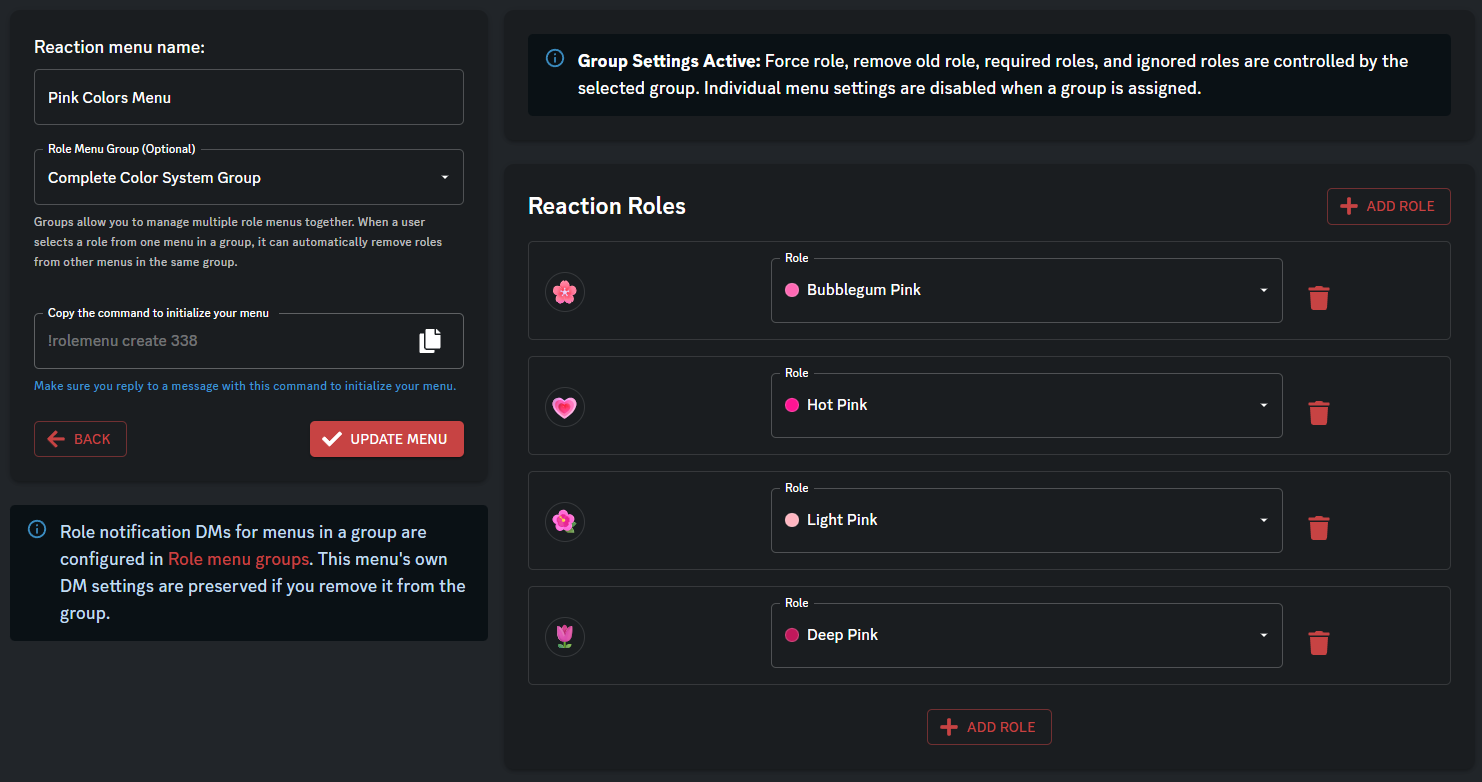
You pair each role with an emoji in the dashboard, then run a short command on the message you want to use.
Limits
Typical caps:
- Role menus — 10 free / 250 premium
- Role menu groups — 2 free / 25 premium
Your dashboard shows the real limit for your plan.
Menu options
These apply when the menu is not in a group:
- Name — only used in the dashboard list
- Group — optional. If you add the menu to a group, some settings move to the group instead
- Require one role — members must keep at least one role from this menu
- Remove old role — picking a new role from this menu can remove their previous choice from the same menu
- Reaction roles — one emoji + one Discord role per row
- Required roles — members need at least one of these roles to use the menu
- Ignored roles — members with any of these roles cannot use it
DMs
For standalone menus you can:
- send Antidote’s default DM when a role is given or taken
- turn DMs off
- send custom saved embeds instead
Groups
Use a group when several menus should share the same rules, like color roles that cannot stack.
The group controls:
- required and ignored roles
- whether picking a new role removes the old one
- whether members must keep at least one role
- DM settings for every menu in the group
If you later remove a menu from the group, that menu’s own DM settings come back.
Post it in Discord
After you save, the dashboard shows a command like rolemenu create <menu_id>. Use your server’s prefix.
Reply to the message, or pass the message ID. Antidote adds the reactions and starts listening.
Remove a menu from a message
Use rolemenu clear with the message ID (Developer Mode → Copy ID), or reply to that message. Check in-Discord help for the exact usage.
Related
- Role templates — create roles, embeds, and menus in one go
Contents

About Antidote
Antidote is a multi-purpose Discord bot designed to give you everything you need. We provide full support for moderation, fun, economy, vc control, profiles and much, much more.